
Whiteout Survival Tundra Trade Route
Tundra Trade Route lets you escort reward trucks and raid other players' cargo in Whiteout Survival. Pick a truck, assign combat heroes and protect its delivery; use the separate raid allowance to take part of an opponent's rewards. Checked in November 2026.
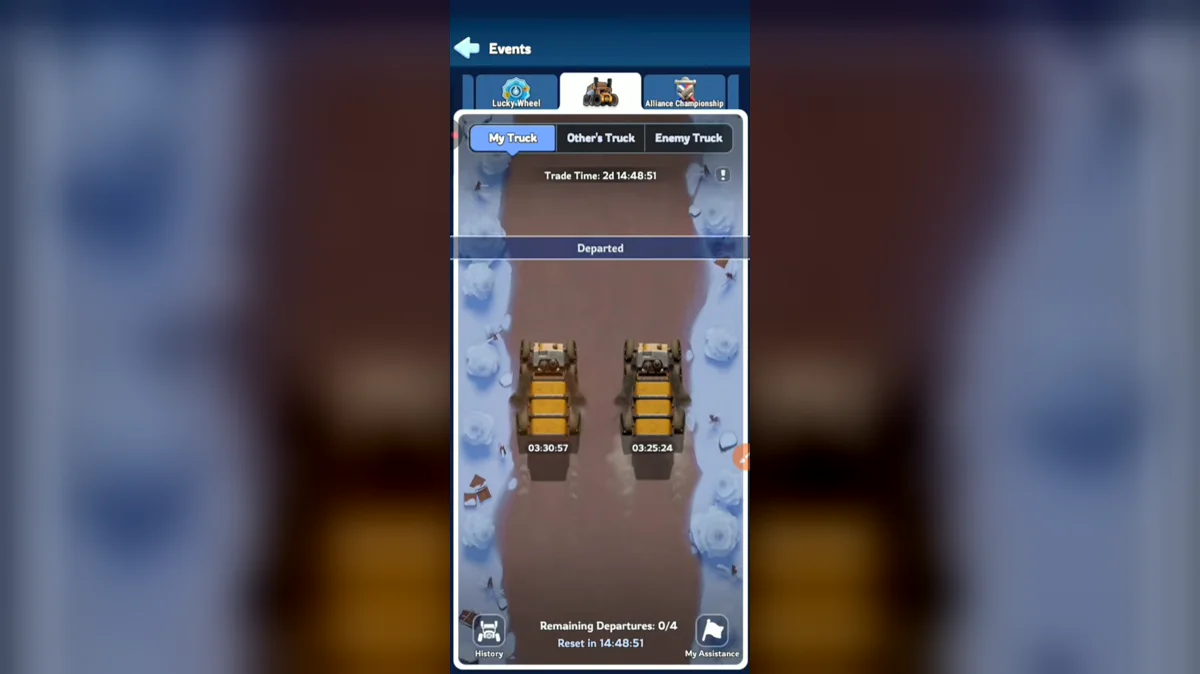
Trade Phases and Schedule
Tundra Trade Route follows a 4-week cycle and lasts 6 days. Its phases are Preview Phase, Trade Phase, Results Phase. The Preview Phase gives you time to plan squads and inspect the event before dispatching. The Trade Phase is where escorting and raiding take place, while the Results Phase resolves the event outcome.
A normal Trade sub-phase lasts 24 hours. The final sub-phase lasts 28 hours, and its final 4 hours are for raids and collecting deliveries rather than starting more escorts. Read the remaining timer before sending a late truck. A new calendar day and a new usable escort window are not always the same boundary at the end of the event.
Daily Escorts and Truck Quality
The base allowance is 4 trucks per day, with 2 traveling simultaneously. Gold Class skill levels can add daily trucks, so the base count is not a universal maximum. Look at your own available departures before planning the day's runs, especially after upgrading an Expert skill.
Higher-quality trucks grant greater escort rewards. Compare their displayed cargo as well as the color: the reward pool can include Mythic General Hero Shard, Essence Stone, Hardened Alloy, Polishing Solution, Charm Design, Hero Gear XP, Pet Food, Resources. Quality tells you the reward tier, while the cargo preview tells you which particular items you stand to receive. A truck with materials you currently need can be more useful than one chosen only for its appearance.
| Truck label | Color | How to read it |
|---|---|---|
| N | gray | Compare the displayed cargo before dispatch |
| R | blue | Compare the displayed cargo before dispatch |
| SR | purple | Compare the displayed cargo before dispatch |
| SSR | orange | Compare the displayed cargo before dispatch |
The standard labels are quality codes, so keep N, R, SR and SSR as shown on the event screen. Do not translate those codes into hero rarity names. A truck's label describes a truck reward tier, not the rarity of the heroes you assign to defend it.
Each departure takes about 3.5 hours before Expert effects. With a limit on simultaneous trucks, dispatch timing determines when another slot becomes available. Plan the first pair around a time when you can return to collect and inspect the remaining departures. You do not need to choose a weaker escort merely to launch both trucks at the same moment.
Refreshing Without Overspending
Each truck has 1 free refresh before Expert bonuses. Further refreshes use Truck Vouchers, then Gems after vouchers run out. The listed SSR guarantee is reached at 6 refreshes. Read the refresh counter and currency prompt each time, because the next press can switch from an event item to your general Gem balance.
Guides recommend spending Truck Vouchers first and avoiding large Gem spending on rerolls. The guaranteed quality does not guarantee that the final cargo is worth every Gem spent reaching it. Set a personal stopping point before refreshing, then compare the current cargo with the upgrade you intend to fund. Do not assume a truck carrying Gems will repay the reroll cost.
Ronne skills can shorten arrival time and add free refreshes. Use the values shown at your current skill level rather than borrowing a fixed percentage from another account. The relevant skill changes the dispatch calculation, so inspect it before deciding how many paid refreshes are still needed or when your next slot will open.
The video covers the trucks you can send, how raids work on the route and which rewards are worth refreshing for.
Escort Heroes and Protection
Each escort squad uses 3 heroes. Guides recommend your strongest combat Expedition heroes, since a march-speed or stamina specialist does not supply the same combat protection. Pick heroes for a fight against a raider, not for the speed of a resource-gathering trip. Review the hero tier list alongside your own skill levels.
You cannot swap the escort after departure. Allocate teams before launching both trucks, and decide which cargo deserves the stronger team. Sending your best heroes on the first truck can leave an equally valuable second truck with a weaker escort. Inspect both cargo choices first if you intend to dispatch them together.
Combat statistics update while trucks are traveling. That is different from changing the assigned hero squad: an existing escort can benefit from improved stats without letting you replace its heroes. Treat the departure selection as a commitment, then continue normal Hero Gear upgrades without assuming the truck uses permanently frozen combat stats.
A stronger escort lowers the chance of a successful raid, but protection does not change the cargo preview into a guaranteed full payout. Keep the possible loss in mind when judging the value of a departure, especially if you intend to spend Gems refreshing that truck. The relevant comparison is useful delivered cargo after risk and refresh cost.
Raids and Cargo Losses
Your daily allowance counts 4 successful raids. Ordinary trucks can be successfully raided 2 times, while a Legendary truck has a separate limit of 1. Do not apply the normal truck rule to every target. Check its remaining raid allowance and cargo before committing an attack.
A raider takes part of the cargo rather than the whole truck. The listed loss ceiling is 50% of the total rewards. A valuable departure can therefore remain worth collecting after being raided, and a defense failure is not the same as losing every reward. Inspect the final delivery rather than writing the run off as empty.
Guides recommend checking the opposing escort's power first and selecting a target your squad can beat. A visually attractive truck with a much stronger defense may be a poor use of your attention. Compare the cargo, escort and remaining successful raid allowance together. Your own successful raid counter and the target truck's raid cap are two separate limits.
| Limit | Base value |
|---|---|
| Successful raids per day | 4 |
| Successful raids on a normal truck | 2 |
| Successful raids on a Legendary truck | 1 |
| Maximum cargo loss | 50% |
| Same-player retry cooldown | 10 minutes |
Alliance Assistance and Rewards
You can request protection for 1 truck per Trade sub-phase. Follow the request timer in the event, especially during the longer final sub-phase, rather than assuming it resets at a particular local midnight. Guides often describe this as a daily request, but the current sub-phase determines when another request becomes available.
Guides recommend reserving an ally's strong assisting squad for valuable cargo. Ask who is available before you dispatch, compare that squad with your own escort and agree which departure it will protect. Assistance works best as a planned assignment rather than a request sent after your heroes have already been committed elsewhere.
Helpers have their own reward limit. A listed assistance reward example contains 1,000 Gems, 5 Lv.2 Custom Resource Chests and 5 speedups lasting 5 minutes each. Compare the event's reward display before accepting work beyond the rewarded-assist cap.
Frequently Asked Questions
Is Tundra Trade Route the same as Tundra Trek?
Tundra Trek belongs to the Expert encounter system; it is not another name for the truck event. Tundra Trade Route has Preview, Trade and Results phases and focuses on escorting or raiding cargo. If you are looking for encounter answers rather than truck rewards, use the Experts section instead of the escort screen.
Is Tundra Trading Station part of the truck route?
Tundra Trading Station is a separate exchange event. Its listed schedule is monthly, with a two-day window, rather than the route's four-week truck cycle. Trade Vouchers can carry over to later Trading Station events. Keep that exchange currency separate from Truck Vouchers used when refreshing a route truck before departure.
Can I send the same heroes on both trucks?
A hero cannot escort multiple trucks at the same time. Each squad uses 3 heroes, so two simultaneous departures need separate available teams. Choose the allocation before dispatch because you cannot change the escort after the truck leaves. An account's strongest single team therefore does not automatically protect both active trucks.
What happens if my raid fails?
A failed attempt does not consume one of the 4 successful daily raids. Raiding also causes no troop casualties, but a repeat attack on the same player has a 10-minute cooldown. Inspect the escort strength before trying again; a failure can help you reconsider the target without turning into a successful raid reward.
Does helping an ally use my own truck slots?
An assisting squad does not occupy your own escort queues. That squad can protect only 1 allied truck at a time, and assistance rewards have a separate daily cap of 3 rewarded assists. Check both the squad's availability and the truck owner's request allowance before accepting another protection assignment.
Read Next
Find related cycles in the Events list, compare Experts and Ronne skills, or prepare your Hero Gear for stronger escorts.